
Run a scan
Add a target
A target is one application on one host. Creating it does not start a scan.
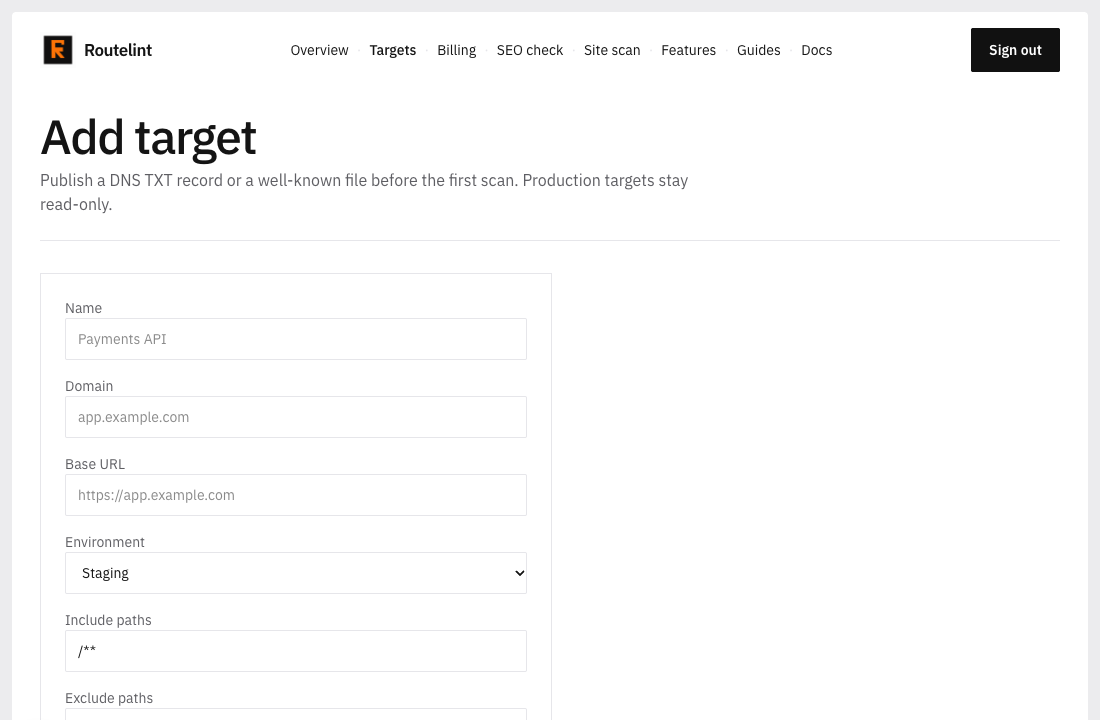
- 01
Name the application
Use a name you will recognize in the targets list. The domain is the host Routelint will accept, such as app.example.com. The base URL is where the browser opens it, such as https://app.example.com.
- 02
Choose the environment
Staging is the default. It allows about two requests per second and stays read-only. Production is an explicit choice: one request per second, still read-only, and each scan asks for an extra confirmation.
- 03
Leave scope wide, or narrow it
Scope starts at every path on that host. Requests to other hosts are dropped. Private addresses and cloud metadata hosts are blocked. Include /api/** and exclude /billing/** when you want the API without billing or logout.
- 04
Save, then prove the host
Saving adds an anonymous identity and opens the target page. Run scan stays disabled until ownership is verified.
Name         Payments API
Domain       app.example.com
Base URL     https://app.example.com
Environment  Staging
Include      /api/**
Exclude      /billing/**, /logout